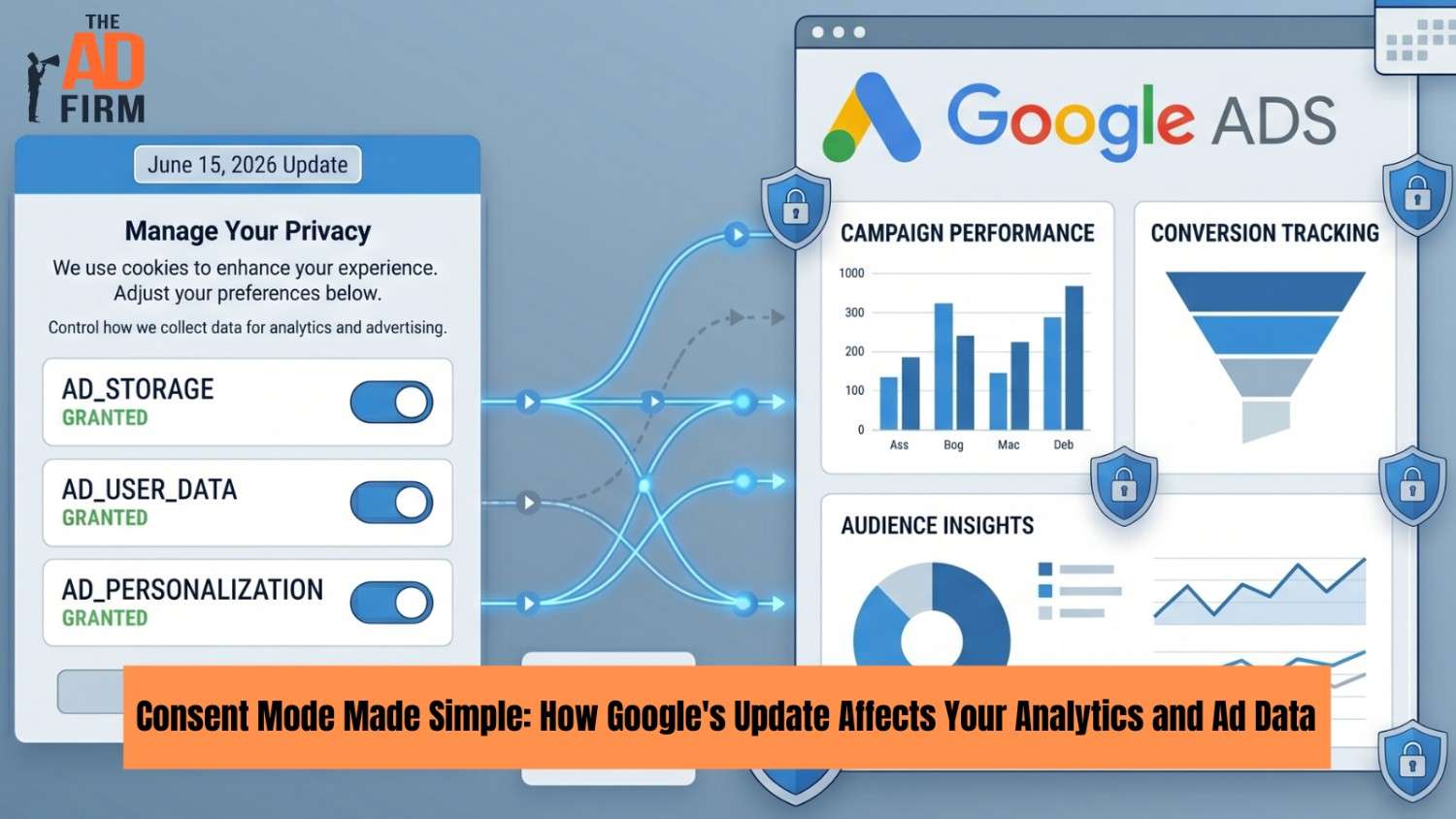
Google Consent Mode v2 is the system that tells Google’s tracking tools what a visitor has agreed to when they interact with your cookie banner. It controls how much data flows to Google Analytics and Google Ads based on each user’s choice.
A June 15, 2026, update narrows the role of the ad_storage signal in Google Ads and removes some of the cross-influence that linked Google Analytics settings used to have on ad data. The shift simplifies a messy area and raises the cost of getting the setup wrong. This post explains how the framework works, what is changing, who it affects, what to do, and how to verify your setup.
For the broader privacy compliance picture, see our companion guide on retargeting under the 2026 privacy rules.
How Consent Mode v2 Works
Google Consent Mode v2 is the bridge between your cookie banner and Google’s tracking products. When a visitor lands on your site, the framework passes signals to Google Ads, GA4, and Floodlight tags, telling each one what the user has agreed to. The tags adjust their behavior accordingly, sending full data, limited data, or no cookies depending on the signal state.
Four parameters carry that information:
- analytics_storage: Governs cookies tied to GA4 and analytics measurement.
- ad_storage: Governs cookies used for advertising, including remarketing and conversion tracking.
- ad_user_data: Governs whether user data can be sent to Google for ad-related purposes.
- ad_personalization: Governs personalized advertising for that user.
Each signal carries a value of granted or denied, set initially as a default and updated when the user makes a choice in the banner. The job of any consent setup is to pass accurate values, update them in a timely manner, and respect the user’s decision across sessions.
Read More: Retargeting Done Right: Complying with 2026 Privacy Rules
Basic Mode vs Advanced Mode
The framework runs in two configurations, and the difference matters more than most documentation makes clear.
- Basic Mode
In basic mode, tags are blocked entirely until the user grants consent. No pings reach Google servers from a denied user, which keeps the implementation simple but provides no recovery path for the data those users would have generated. Basic mode suits low-volume sites or accounts where compliance simplicity outweighs the completeness of measurement.
- Advanced Mode
In advanced mode, tags fire on every page load but adjust their payload based on the consent state. Denied users still send cookieless pings that contain limited, aggregated information, which Google uses to model the conversions and behavior of unconsented traffic. Advanced mode unlocks modeled conversions but requires the correct configuration of the gtag consent API or an integration with a consent management platform. For most ad-spending accounts, advanced mode is the configuration that pays back the implementation effort.
What Denied Consent Actually Means
A common misconception treats denied consent as a hard cutoff. It is not. When ad_storage is denied, advanced mode keeps a limited measurement path open through cookieless pings, conversion modeling, and aggregated reporting. What goes away is deterministic, user-level tracking, and the ability to add that user to remarketing audiences. What remains is a partial, modeled, and threshold-dependent measurement that still supports campaign optimization at the account level.
That nuance cuts both ways. Granted consent does not unlock perfect deterministic tracking either. ITP, browser-level cookie restrictions, and signed-out sessions still introduce gaps. The framework reduces consent ambiguity, but it does not solve the broader cookieless measurement challenges sitting underneath it.
What Changes on June 15, 2026
The June update narrows the scope of how consent settings influence ad data. Until now, Google Ads data flows were shaped by a combination of Consent Mode signals and Google Signals settings inside GA4, with some controls buried in Analytics rather than the ad consent layer. The result confused marketers and made compliance harder to explain.
Starting June 15, Google Ads data collection relies more directly on the ad_storage signal, and the linked Google Analytics tag no longer influences what Ads can use. The change targets a specific type of cross-product complexity, not the entire architecture of Google’s ad ecosystem.
A parallel change covers IP address handling. Google has indicated that IP addresses collected automatically by the Google tag and SDK will be encrypted before flowing to linked Google Ads accounts, where they will be governed by Ads-side settings rather than Analytics-side settings. Google has not yet confirmed the exact date for the IP change, only that it will roll out later in 2026.
The Practical Effect on Ad Data
If a user grants ad_storage, Google Ads can use the available advertising signals, including linking activity to a signed-in Google account when one is present. If a user denies ad_storage, Google Ads is constrained to less persistent identifiers, such as URL parameters like gclid, with modeling filling part of the gap when advanced mode is configured.
The simplification helps in two ways. First, advertisers gain a clearer set of rules for what controls ad data, making implementation audits faster. Second, the consent banner becomes the primary lever, removing a category of bugs where misconfigured Analytics settings quietly suppressed or expanded ad data flows. The trade-off is reduced fine-tuning. Setups that depended on linked Analytics behavior to shape ad data will need to move that logic into the consent banner itself.
Where Google Signals Fits
Google Signals in GA4 supports cross-device reporting and remarketing audiences for users signed into Google accounts who have opted into ad personalization. Its role on the ads side has always been indirect and constrained by user-level controls, so the June update does not eliminate Google Signals. It clarifies that Ads should not look to it for ad data collection rules, leaving Google Signals to do what it was designed for in Analytics.
For brands that already had Google Signals turned off in GA4, the practical change after June 15 is small. For brands relying on linked Analytics behavior to shape audience data, the consent banner now needs to do that work directly.
What the June 15 Change Means for Your Ad Data
The H1 promises ad data as a co-equal concern with analytics, and the practical effects on Google Ads campaign management deserve their own section. Three areas see a direct impact.
Remarketing Audience Size
Remarketing lists in Google Ads will reflect users who granted ad_storage through the banner. Accounts that previously leaned on Google Signals as a fallback for capturing audience data will see lists drawn from a smaller pool after June 15. The size of the change depends on your consent capture rate. Accounts with strong banner UX and consent rates above 60% will see modest shrinkage. Accounts with weak banners or default-deny configurations will see lists drop significantly, and the gap shows up immediately in audience-targeted campaigns.
Smart Bidding Signal Quality
Smart Bidding strategies such as Target ROAS, Maximize Conversions, and Target CPA rely on conversion signals to optimize bids. When ad_storage denials reduce the consented signal pool, the algorithm has less data to work with. In advanced mode, modeled conversions partially compensate. In basic mode, they do not. Accounts running Smart Bidding through the transition should plan a brief reoptimization period in the first two to three weeks of June, since the bid algorithm will need to recalibrate to the new signal volume.
Conversion Volume in Reports
Conversion volume reported in Google Ads will shift based on how the account currently captures consent. Accounts with Consent Mode v2 already running in advanced mode should see minimal change, since the consent layer was already doing the work. Accounts that depended on the Google Signals fallback to backfill conversion data will see a drop in reported conversions on June 15 unless the ad_storage configuration is corrected first. The drop is not lost performance. It has lost visibility into performance that was always borderline-compliant.
Who This Affects Most
The impact varies by account configuration. Three scenarios cover most setups.
- Consent Mode v2 advanced mode, properly configured: Minimal change. The consent layer was already controlling Google Ads data flow. Verify signal accuracy before June 15 and move on.
- Google Signals off, Consent Mode active: No meaningful change. Google Signals was not feeding the Ads side, and Consent Mode was already the single control.
- Google Signals on, Consent Mode incomplete or missing: The largest impact group. After June 15, Google Signals no longer backfills Google Ads data collection. Without a working Consent Mode v2 setup, there is no user-preference-based control to replace it, which creates both reporting gaps and compliance exposure.
Regional Compliance Context
Consent Mode v2 is a compliance requirement for advertisers reaching users in the EEA, the UK, and Switzerland under EU rules, including the GDPR and the ePrivacy Directive. Google enforces this for personalized advertising and remarketing audiences in those regions, which is why most CMPs default to a TCF-compliant banner for European traffic.
Outside those regions, the picture differs:
- United States: No federal mandate requires Consent Mode v2. State-level laws such as the CCPA, CPRA, and the growing list of comprehensive privacy statutes shape consent requirements, but Google does not block ad features based on geography in the same way it does for the EEA.
- Other regulated markets: Brazil’s LGPD, Canada’s PIPEDA, and similar frameworks impose their own consent rules, often requiring a CMP but not specifically tied to Google’s signal framework.
- Optional adoption for measurement quality: Many US-focused advertisers implement Consent Mode v2 anyway, since the framework improves measurement consistency and prepares the account for state-law expansion. The same logic applies to other privacy shifts covered in our Google Privacy Sandbox guide.
If your CMP supports the IAB TCF v2.2 framework, the integration with Consent Mode v2 is well-documented. CMPs without TCF support usually require a custom mapping, which adds setup time and increases the risk of signal mismatches.
Technical Implementation: Gtag, GTM, and Server-Side
The framework can be installed in three ways, and the choice depends on your existing tag infrastructure.
Gtag Consent API
A direct gtag setup uses two function calls. The first sets the default consent state before any tracking tags load, and the second updates it after the user makes a choice.
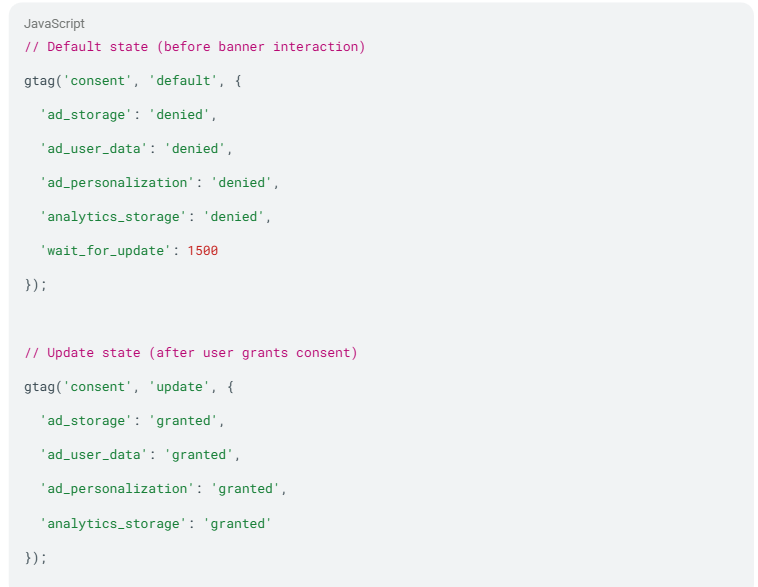
The wait_for_update parameter holds tags briefly so they fire with the correct consent state once the user interacts with the banner.
Google Tag Manager
In GTM, the Consent Initialization trigger fires before all other triggers and is where the default consent state belongs. A separate Consent Update trigger fires when the banner state changes. Most major CMPs offer prebuilt GTM templates that handle both, which simplifies the install for teams without a developer on hand.
Server-Side Tagging
Server-side containers respect the consent state passed from the client, and the integration point is the consent parameter in incoming events. Server-side setups add resilience against ad blockers and improve data quality, but they require the client-side consent state to be accurate before the event reaches the server. Server-side does not bypass consent. It honors what the client passes.
For high-spend or lead-generation accounts, pairing this server-side foundation with Enhanced Conversions in Google Ads and the Conversions API for other ad platforms has become the standard for privacy-safe performance measurement. The pairing does not change consent compliance, but it preserves attribution quality once the consent layer is in place.
Validation and QA: How to Confirm It Works
A working install is not the same as a verified install. The QA layer catches issues that stay invisible in production reports until weeks of data have already drifted.
Tools and checks worth running:
- Tag Assistant (Chrome extension): Confirms which tags fire on each page, the consent state at the time of firing, and whether the consent update event triggered correctly.
- GA4 DebugView: Shows real-time event flow with consent state attached. A denied user should still produce cookieless pings; a granted user should produce full events.
- Consent state inspection: Run google_tag_data or dataLayer inspection in the browser console to verify default and updated states match what the banner is supposed to send.
- Cross-product reconciliation: Compare conversion volume in Google Ads against GA4 over a 14-day window. Material divergence usually points to a consent or tag timing mismatch.
- Region-based testing: Use a VPN to simulate EEA traffic and confirm the EEA-specific banner behavior works. US-default banners often fail to show TCF-compliant flows for European visitors.
The most common audit finding is consent-state inconsistency between client-side and server-side reports, followed by tag-firing-order issues that send a single pageview under the wrong consent state. Both are fixable and remain invisible without an active QA process.
Common Implementation Pitfalls Beyond the Basics
Banner timing and default-deny configurations are the entry-level failure modes. The harder issues sit at the edges of the system:
- Region-based consent inconsistency: A single global banner often misapplies EEA logic to US users (over-suppressing data) or US logic to EEA users (creating compliance risk). A geo-aware CMP configuration handles this.
- Server-side consent propagation gaps: Client passes the right state, but the server-side container’s outbound calls to Google strip or override the consent parameter, breaking the chain.
- GA4 vs Google Ads conversion mismatches: Conversions appear in one product but not the other, usually due to differing attribution windows and consent gaps that affect each product differently.
- Stale consent state in single-page apps: SPA frameworks that do not re-fire the consent update on route changes leave subsequent pageviews running under an outdated state.
Each of these calls for investigation rather than a checklist fix. The useful part is that they all leave fingerprints in DebugView and Tag Assistant if someone is looking.
Banner Design and Reporting Strategy
Two operational habits separate accounts that adapt well. First, banner UX is now a lever for performance. In advanced mode, modeled conversions depend on consented data volume, so consent rate becomes a direct input to reporting accuracy. Plain-language copy beats legal phrasing, equal visual weight between accept and manage preferences avoids dark-pattern flags, mobile-first layouts reduce reflexive dismissals, and granular options often lift total consent compared to all-or-nothing flows.
Second, reporting cadence should match the new data quality. Modeled and observed data combined produce noisier day-over-day variance than deterministic cookie tracking did, and reading daily swings as performance signals leads to bad decisions. Move primary cadence to weekly or monthly views, adopt blended reporting in GA4 to combine observed and modeled data in a single view, and brief stakeholders on the new baseline ahead of June 15.
Read More: The Impact of GA4: Navigating Google Analytics in 2025
Frequently Asked Questions
Is Consent Mode v2 required for all Google Ads accounts?
It is required for advertising to users in the EEA, UK, and Switzerland under EU rules. For US-targeted accounts, it is optional but increasingly standard, since it improves measurement quality and prepares the account for evolving state-level privacy laws.
What happens to remarketing audiences after June 15, 2026?
Audience size will reflect the number of users who granted ad_storage via the banner. The cross-influence from linked Google Analytics settings disappears, so accounts that relied on Analytics-side controls to shape ad audiences will need to handle that logic in the consent banner itself.
Will modeled conversions show up in my Google Ads reports?
Yes, when Consent Mode v2 runs in advanced mode, and your account meets Google’s data thresholds. Modeled conversions appear alongside observed ones in standard reports. They are estimates, not deterministic counts, and accuracy depends on the volume of consented data available for the model.
What’s the difference between basic mode and advanced mode?
Basic mode blocks tags entirely for denied users, producing no data from that traffic. Advanced mode lets tags fire with adjusted payloads, producing cookieless pings that support modeled conversions. Advanced mode recovers the most measurement values, but it calls for more careful setup.
Do I need Enhanced Conversions to comply?
No. Enhanced Conversions is a separate measurement enhancement that improves attribution by sending hashed first-party data. It is recommended for high-spend or lead-generation accounts where attribution loss is costly, not part of consent compliance itself. For more on how attribution is shifting overall, see our breakdown of the future of PPC attribution in Google’s privacy-centric landscape.
How long does proper implementation take?
A clean install with QA usually runs 2 to 4 weeks, depending on tag complexity, CMP integration, and any server-side coordination. Faster timelines are possible for simple sites; complex multi-region setups can take longer.
Get Your Consent Setup Reviewed Before the June Deadline
The June 15 update does not rewrite your tracking architecture, but it does raise the cost of consent setup mistakes that may have been masked until now. A short audit covering banner timing, signal mapping, advanced mode configuration, and cross-product reconciliation usually surfaces the issues before they affect a full quarter of campaign data.
The Ad Firm’s PPC management team handles Consent Mode v2 reviews end-to-end. We check your current configuration against the June changes, validate signal flow in DebugView and Tag Assistant, document any region-based gaps, and align your reporting cadence with the new data quality baseline.
Contact us to schedule a consultation to walk through your current setup. The PPC experts at our digital marketing agency will tell you what is working, what needs adjustment, and where the practical priorities sit before the update arrives.